0.1.0
Released: 2026-10-08
Most important changes
- The first public release in the Chrome Web Store
- Your own links on every new tab, in profiles, workspaces, groups and subgroups
- Recently closed tabs in a panel on the right edge
- Backup and synchronization across browsers and devices with an account
- Save the page you are on from the toolbar icon, a keyboard shortcut or the right-click menu
Tabilinks replaces the empty new tab page with your own links, organized in a hierarchy: switchable profiles, their workspaces, groups in each workspace and optional collapsible subgroups inside a group.
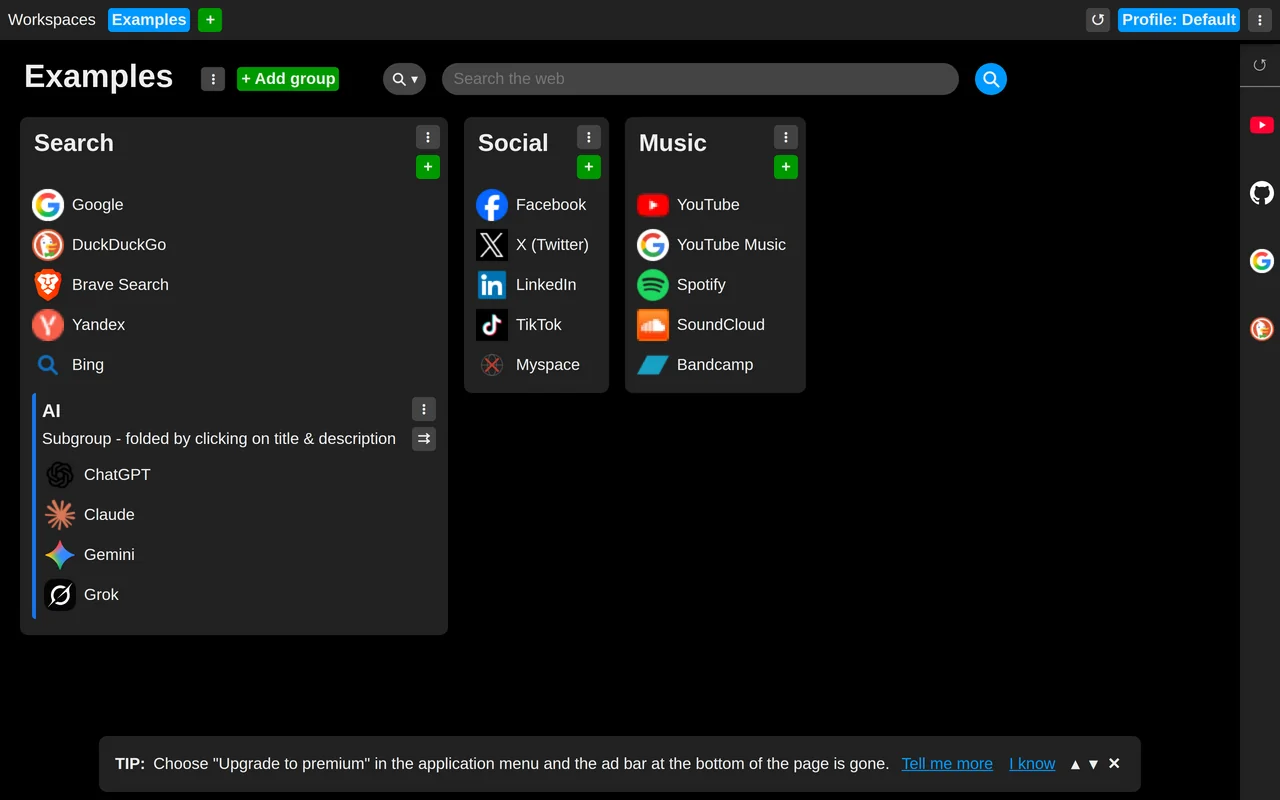
Working with links
- Drag and drop for moving and sorting groups, subgroups and links.
- Open all links of a subgroup at once, and let a subgroup catch its links into a tab group of its own color, wherever in the browser they are opened from.
- Save the page you are viewing from the toolbar icon, a keyboard shortcut you can bind (even Ctrl+D) or the right-click menu, which lists the open workspace's groups and subgroups.
- A search bar on the new tab page, using the browser's own search engine by default.
Closed tabs
The panel on the right edge unfolds when the mouse rests there and lists the most recently closed tabs, ready to reopen or keep as a link.
Account and synchronization
The extension works fully without an account. Signing in backs your links up and synchronizes them to every browser and device signed in to the same account.
Also in this release
- Settings, including the size of the interface.
- Tips about the less obvious features, in a bar on the new tab page.
- Website icons shown beside links.
- Your own background image for premium users.
- English and Slovak.
All releases